
How do I link my activity to my funder?#
Publishing links between your activity and your funder creates traceability — a visible chain from donors through to implementing organisations. You do this in two places in your IATI activity data: participating organisations and transactions.
Steps to complete#
You can find the organisation identifiers of common funders in the table below:
| Funder | IATI Organisation Identifier |
|---|---|
| Belgium - Ministry of Foreign Affairs | XM-DAC-2-10 |
| Denmark - Ministry of Foreign Affairs (Danida) | XM-DAC-3-1 |
| Netherlands - Ministry of Foreign Affairs | XM-DAC-7 |
| Sweden - International Development Cooperation Agency (Sida) | SE-0 |
| United Kingdom - Foreign, Commonwealth & Development Office (FCDO) | GB-GOV-1 |
| United Kingdom - Department of Health and Social Care (DHSC) | GB-GOV-10 |
If you don’t know the relevant activity to link to for your funder, contact them or search their activity data on d-portal. You can include your funder’s name, organisation identifier, and organisation type in your publication initially, then add the activity identifier at a later date.
Include every organisation involved in the activity — funding, accountable, extending, and implementing. An organisation can hold multiple roles, in which case list it once per role.
Also list your organisation (with role = “Accountable” or “Implementing”) and any downstream partners you fund.
Incoming Funds (code 1) = money already received. Incoming Commitment (code 11) = money promised but not yet transferred.
‘provider-activity-id’ can be found within the ‘provider-org’ element of a transaction.
If your organisation runs a programme with multiple activities (e.g. a parent programme and several country-level sub-activities), link them using ‘related-activity’.
Checklist before you publish#
I have my funder’s IATI organisation reference
I have my funder’s IATI activity identifier for this project
My funder is listed under ‘participating-org’ with role = 1 (Funding)
Each incoming transaction includes a ‘provider-org’ with @provider-activity-id
My own organisation is listed under ‘participating-org’ (accountable or implementing role)
Example#
In the example below, the UK Foreign, Commonwealth & Development Office is being referenced as the ‘provider organisation’ (i.e. funder).
Within an activity transaction, enter the following data about your funder:
organisation reference (e.g. “GB-GOV-1” for FCDO)
provider activity id (e.g. “GB-GOV-1-300001”)
organisation type (e.g. “10 - Government”)
narrative (i.e. their name)
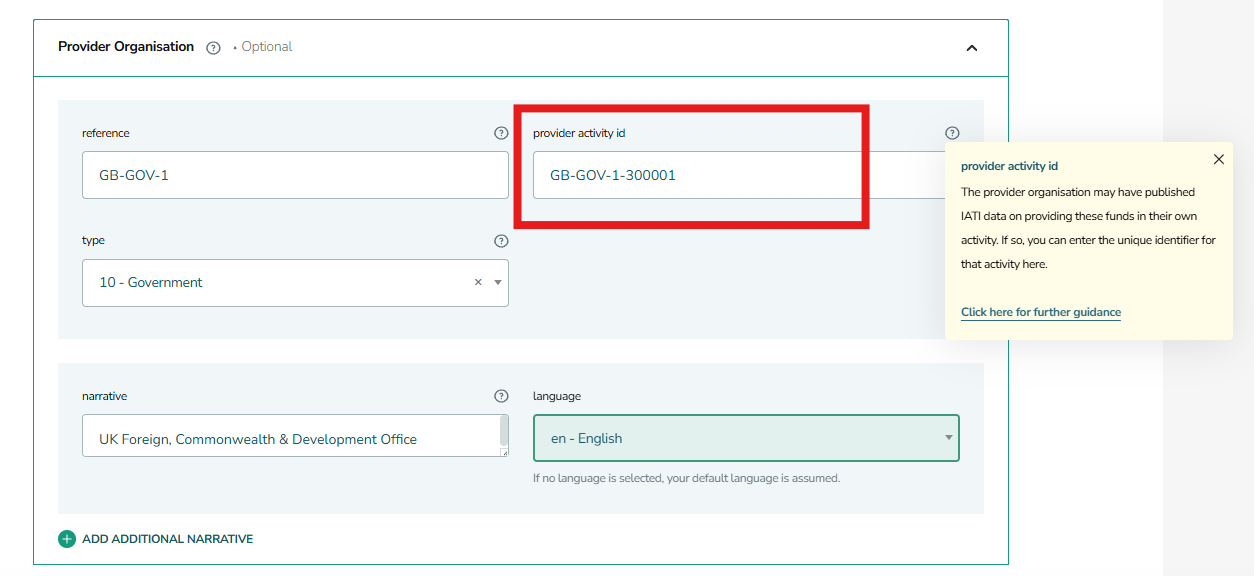
Figure 1: Where to populate the ‘provider activity ID’ within a transaction in IATI Publisher#